
The working relationship.
Space for a client’s own words about collaborating with Abacoa Digital.
Client name to be addedBusiness or role · Pending quote
Your next customer still needs an answer. Abacoa Digital builds AI receptionists and connected software that capture the request, organize the details, and give your team a clear next step.
Founder-led in Jupiter, Florida. Built around your business.
Try Elliot, our AI receptionist · (561) 589-7339
Your calls, customer details, and daily work belong together. Explore a connection to see what we can build.
A ringing phone. An after-hours booking. A new project inquiry. Explore how connected software can turn each one into a clear next step.
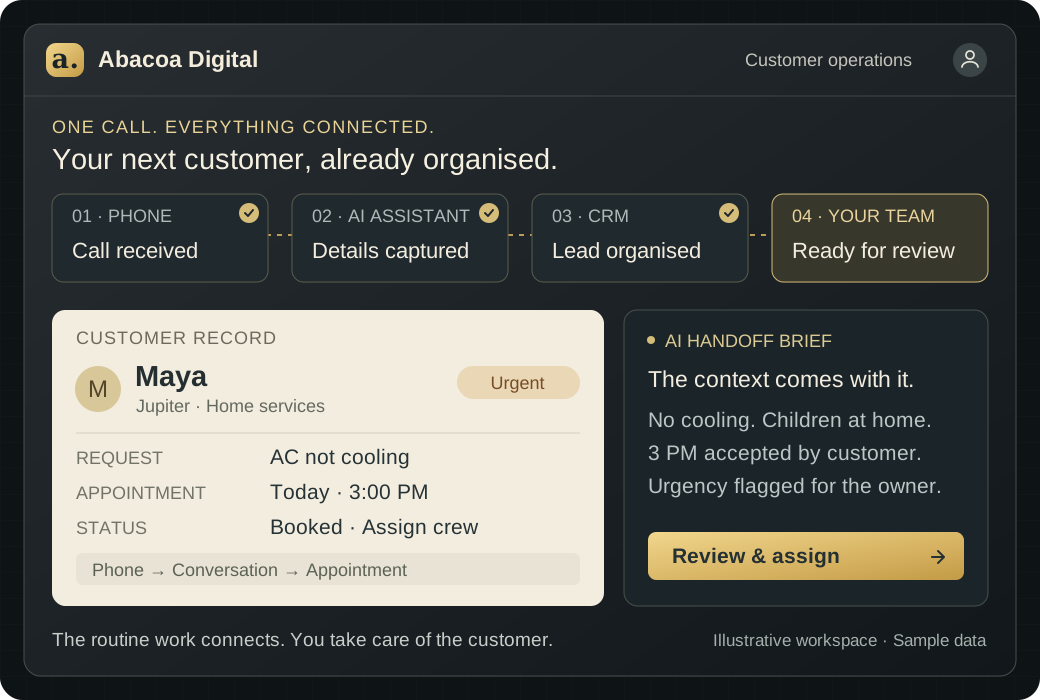
The owner is juggling staff and deliveries. Maya is at home with a broken AC and two hot, restless children. She needs help today.
“Our AC is broken. Can someone come today?”
Elliot captures the urgency and confirms 3 PM. The owner gets the details needed to send the crew.
Illustrative scenario · Sample appointment and customer details.
An HVAC owner is juggling staff, deliveries, and a ringing phone. At home, Maya is hot and upset because the AC is broken and her children need help. Elliot, the AI receptionist, answers her call, offers an available 3 PM appointment, and confirms it with her. He flags the job as urgent and captures the details. When the owner checks his system, the appointment is already booked. He reviews the urgency and sends his team the job information so they can get rolling. Abacoa Digital: You do the work. We connect the rest.

Tomorrow · 2:30 PM · Reminder scheduled
Explore this recordExplore the completed example, or play the workflow step by step.
Follow one call through the connections. An AI receptionist handles the intake. Your software organizes the details. Your people bring the judgment, care, and expertise.
Scroll through the story
Maya's AC has stopped working. The owner is already helping someone else. Her call can still reach a helpful first answer.
The AI receptionist answers, captures the problem and callback details, and identifies urgency using the business's rules.
The conversation becomes a customer record and a useful brief in the owner's workspace. No copying notes between systems.
The owner prioritizes the job. The technician diagnoses the fault. Your team spends more attention on customers, relationships, and skilled work.
Home services · Jupiter, Florida
“Our AC is broken. Can someone help today?”
“I can help with that. Where is the property, and what's the best number to reach you?”
“We're in Jupiter. It's getting really hot, and my kids are home.”
AC is not cooling. Children are at home. Needs help today. Customer and callback details are together for the team.
Next step: owner reviews and assigns the job.
The details are ready. Your team brings the expertise.
A useful first system can handle selected overflow calls and give your team a brief they can act on. Build the next connection around the work you actually do.
Illustrative workflow. We agree on routing, scope, price and the human handoff before building. CRM connections, booking and custom integrations are scoped separately.
The call, the customer record and the next step, connected in one workspace. Your team gets the context. You decide how to help.
In this separate example, a business asks Abacoa for help. Change the inquiry to see how its assessment and suggested reply change.
Ready for an inquiry
Run the example to turn this inquiry into a lead assessment and a response draft.
Start with the part of your business that needs help. We connect voice, software, and workflows around your team, your customers, and the way you work.
Follow one inquiry from an email to the information your team needs. The tools can look familiar. The connection is what changes the day.
The request for a second-location website connects to a lead row, customer record, team brief, project tasks and reporting.
Keep the tools that work for you. Let Abacoa Digital connect the missing handoffs.
Connect our workflowBring the customer record, conversations and activity into a workspace built around the team’s actual day.
Voice agents, chat assistants, and autonomous workflows that do the repetitive work for you. The hours you spend answering, qualifying, and following up go back on your calendar. Built around your knowledge, with the right model for the task.
Talk about an AI assistantFast, accessible, well-built sites and apps that sell and serve while you sleep. Marketing pages, customer portals, dashboards, and mobile experiences that convert without you in the loop, built to last.
Explore your website or appOne layer between you and every lead across SMS, email, voice, and chat. It answers in seconds, qualifies intelligently, and routes only the work worth your time, so you stop living in the inbox.
Connect your customer follow-upDashboards and pipelines that turn raw activity into the three numbers you actually run on. Less time digging through reports, more time knowing where to act.
Bring your information togetherThe first impression that does the qualifying for you. Identity, positioning, and a public-facing surface that signals you can be trusted, so the right customers arrive already sold.
Talk about your digital presenceThe internal tooling your team will actually use. Operations dashboards, custom CRMs, intake automations, and integrations that take the manual steps off your plate and hand the hours back.
Simplify a workflowConnect the tools that earn their place. Build the missing pieces around your business.

Your customers need your attention. Your team needs your expertise. Re-entering details and chasing routine updates shouldn’t fill the day.
We build the intake, customer records and handoffs around your business, so you can focus on the people and work that need you.
Tell Abacoa Digital what needs to change. We review the problem, your existing tools and what a useful result would look like.
Agree on the scope, price, timeline and connections before the build starts. Keep the first version focused enough to put to work.
Review working software and realistic scenarios. Refine the handoffs, messages and decisions with the people who will use it.
Put it into use with a clear handoff. Add monitoring, tuning and further improvements through the support arrangement you choose.
You don’t need a technical brief. A real example of what slows you down is a useful place to start.
Talk about your businessTestimonial placeholders. Real, approved feedback will replace these before public launch.
Space for a client’s own words about collaborating with Abacoa Digital.
Space for approved feedback about a specific improvement in the working day.
Space for a real account of how the work helped the people using it.
The customer conversation. The lead record. The next action. Software that puts the information where your people can use it.
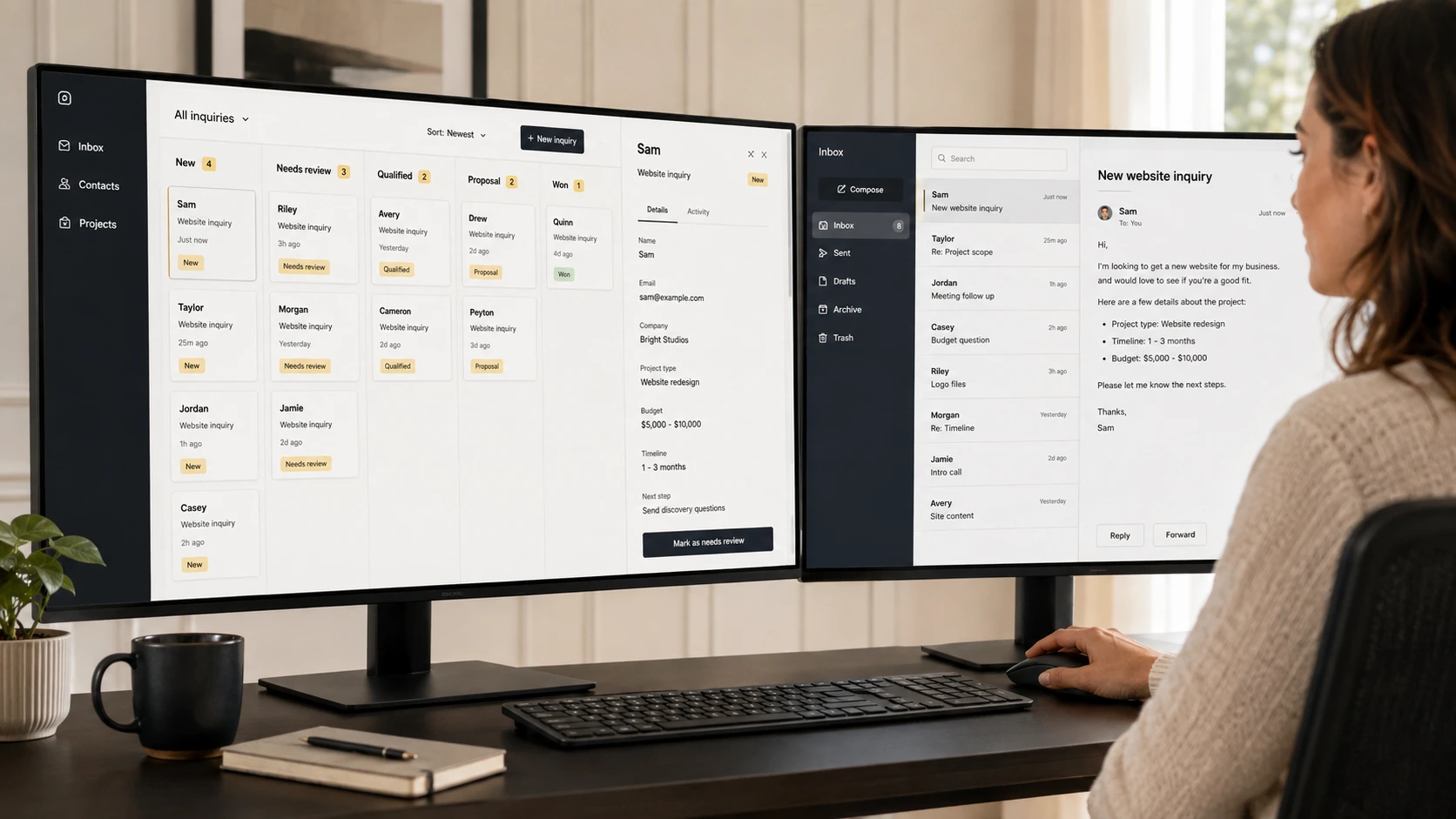
An inquiry arrives with the customer’s question and the details your team needs.
02A customer record brings the request, its history and the next step into view.
03The team sees what needs review and what should happen after it.
Independent products, built and funded by us. Explore the thinking, care, and working software behind the studio.
A secure, simple home for every credit card you carry. Balances, limits, due dates, rewards, statements, and account changes, all organized in one place instead of five logins and a pile of paper.
The business idea: scattered information, brought into one useful view.
A renter's command center for the messy middle, everything between "you're approved" and "here are your keys." Status dashboard, payment safety check, document vault, lease summary, insurance tracker, and nudge templates.
The business idea: a complex customer journey with clear next steps.
A verification layer for AI meeting notes. It cross-checks summaries from Otter, Fathom, Granola, Zoom, or Teams against the transcript and flags hallucinations before you send.
The business idea: useful AI with evidence people can review.
The same thinking can shape your customer portal, internal workspace or next product.
Discuss something built for youA shared lead tracker. A clear project board. The tools your team knows, connected to the next step. Choose a starting point to explore how the work could come together.
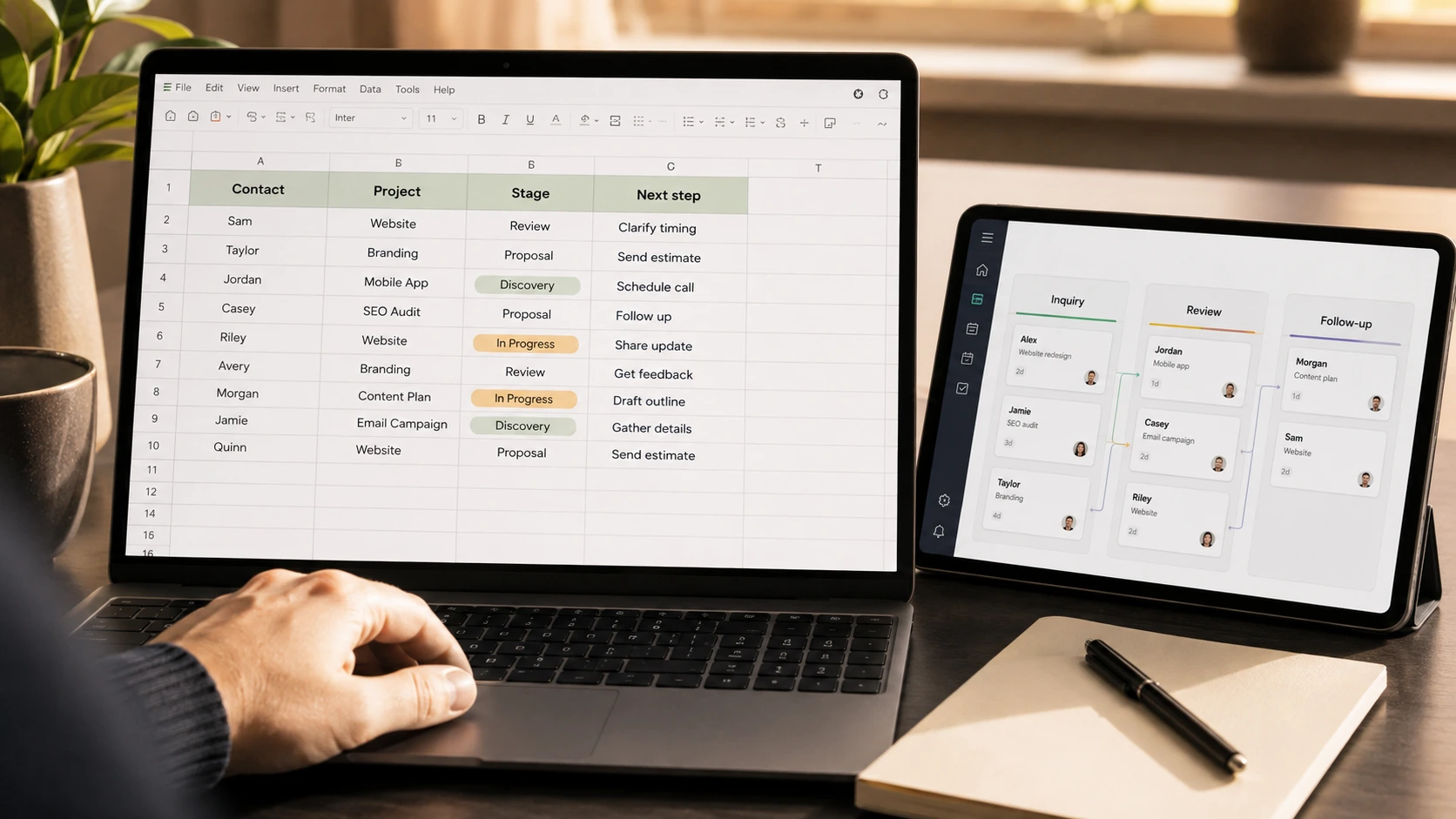
Start at the phone. Add the connections that make the conversation useful to the rest of your business.
Answer common questions and collect the customer’s need, contact details and urgency.
Link the call brief to a customer record, available appointments and a team notification.
Review call outcomes and unresolved requests to refine how the assistant helps.
An example direction. Your priorities, existing tools and agreed scope shape the actual build.
Abacoa Digital brings the design, software and AI work together. Mike leads the project with you, keeping the build connected to the people who will use it.
Keep the tools that serve you well. Connect the missing handoffs and build the software your team needs to move forward.
Start with a clear scope, review working software and make the next decision with what you’ve learned. The system can grow with the business.
A helpful assistant can guide a visitor, answer a common question and gather the context your team needs. Try a short example, then explore what would make it useful for your business.
Guided chat example · No live agent or booking
A focused project or ongoing support. Start with the problem; we agree on the scope and price before work begins.
Custom builds (new sites, complex integrations) quoted separately. Voice overage $0.49/min.
Founder-led. Work with Abacoa Digital on the scope, priorities and build. Ask about a project, a managed plan, or how the two can work together.
Monthly plans: month-to-month · Annual plans: billed yearly.
Start with the problem. We can work out the right scope together.
Useful things to know when you’re deciding what belongs in your business.
That is part of the discovery conversation. We review your CRM, calendar, forms and team tools, then confirm which connections are practical before agreeing the scope. Bring the names of the tools you want to keep.
You define its responsibilities. A system can answer questions, collect information and act within agreed rules, with owner review or a human handoff for the situations you choose. We work through those boundaries during the build.
The homepage stories and dashboard are illustrative examples with sample data. Briar, Bramble and Polish are our own products. They show the kind of work and thinking we can bring to your project.
Yes. Mike leads the project conversation, scope and build at Abacoa Digital. Our AI receptionist can capture your inquiry when you call. You can also email Mike directly.
Use the existing-client route below. Include your business, the system involved, what changed and the impact. Prepare a project update or support request.
Not sure where to begin? Tell us what gets in the way.
Let’s connect the parts of your business that should already work together. Bring the everyday friction, the idea you keep putting off, or the next thing you want to build.
AI agents · Custom software · Connected workflows
hello@abacoadigital.com
Meet Elliot, Abacoa Digital’s AI receptionist. Call for a trial conversation about your business and experience the first few minutes of an AI-assisted intake.
Call Elliot for a trial (561) 589-7339A real call to our AI receptionist. Your own assistant would be built around your business, knowledge and rules.
Need a change, have a question, or something needs attention? Let the team know what’s happening and which project or system is involved.